RenderDrop - AE/PPro/AME レンダリング完了Discord通知 & Dropbox・Google Drive自動アップロード
- ダウンロード商品通常版¥ 400
- ダウンロード商品お布施用(内容は同じです)¥ 1,500
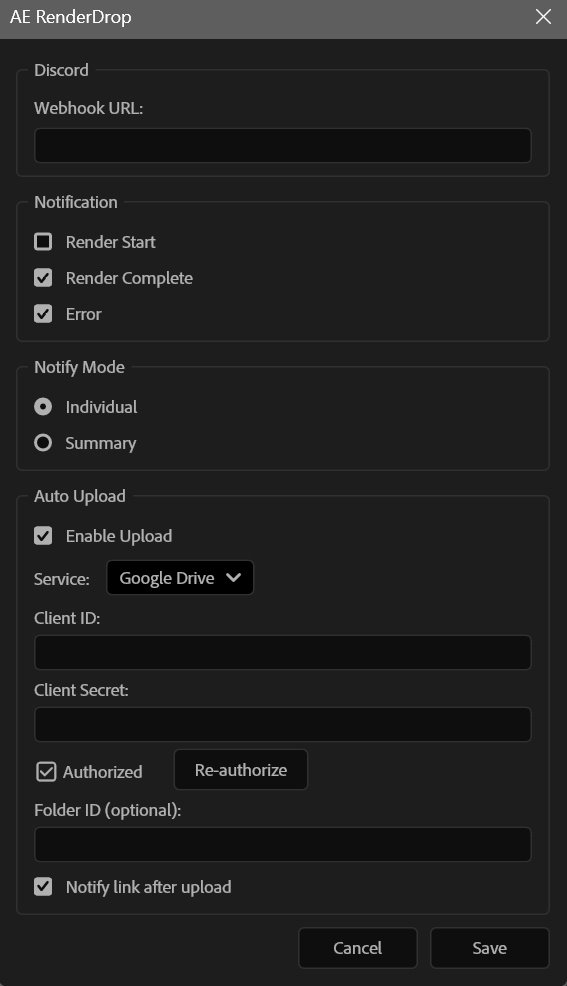
RenderDrop は、After Effects / Premiere Pro / Media Encoder のレンダリング状況を Discord にリアルタイム通知し、Dropbox や Google ドライブへ自動アップロードを行う CEP エクステンションです。 レンダリングの開始・完了・エラーをスマホで確認できるから、別の作業をしながら、外出しながら、寝ながらレンダリングの進捗を把握できます。さらにはアップロードされた動画を URL ですぐに確認、共有できます。 ━━━━━━━━━━━━━━━━━━ 🎬 対応アプリケーション ━━━━━━━━━━━━━━━━━━ ・After Effects — フル対応(通知・アップロード・設定パネル) ・Premiere Pro — v3.0.0で対応!(通知・アップロード・設定パネル) ・Media Encoder — v3.0.0で対応!(AE/PProと連携して自動通知・アップロード) 💡 3つのアプリ間で設定は自動共有。どのアプリから設定しても即反映されます。 ━━━━━━━━━━━━━━━━━━ ✨ 主な機能 ━━━━━━━━━━━━━━━━━━ 🔔 Discord リアルタイム通知 レンダリングの開始・完了・エラーを Discord Webhook で即座に通知。スマホでも PC でもどこからでも確認できます。 📊 詳細なレンダリング情報 通知には以下のメタデータが自動で付与されます: ・解像度(例: 1920×1080) ・フレームレート(例: 29.97fps) ・再生時間 & フレーム数 ・出力ファイルサイズ ・レンダリング所要時間 ・出力モジュール名 📤 Dropbox / Google Drive 自動アップロード(オプション) レンダリング完了後、出力ファイルを自動でクラウドにアップロード。共有リンクも Discord に自動送信されるので、チームへの共有が一瞬で完了します。 🎯 2つの通知モード ・個別通知 — 各コンポの完了ごとに詳細通知 ・サマリー通知 — 全コンポ完了後にまとめて1通 🔄 マルチアプリ連携(v3.0.0 新機能) ・AE と PPro を同時に起動して使用可能 ・AE → AME / PPro → AME のエクスポートフローに対応 ・出力パス情報を自動共有し、どちらのアプリからのエンコードも正しく検出 ・OneDrive 環境でも安定動作 ━━━━━━━━━━━━━━━━━━ 📋 通知イメージ ━━━━━━━━━━━━━━━━━━ 個別通知の例: ✅ main_comp のレンダリングが完了しました 📐 1920 × 1080 @ 29.97fps ⏱️ 00:01:30:00 (2697 frames) 🏞️ H.264 - Match Render Settings 📦 245.3 MB ⏳ 3m 42s 📂 C:\output\main_comp.mp4 サマリー通知の例: ✅ レンダリング完了: main_comp — ⏱️ 1:30 | 📦 120.5 MB | ⏳ 1m 12s intro_comp — ⏱️ 1:00 | 📦 340.2 MB | ⏳ 2m 30s ━━━━━━━━━━━━━━━━━━ 🔒 プライバシー・セキュリティについて ━━━━━━━━━━━━━━━━━━ ・Discord 通知:公式 Webhook API を使用。データは Discord のサーバー経由で送信され、第三者に漏れることはありません。 ・Dropbox / Google Drive 連携:各社の公式 OAuth 認証を使用。当ツールはファイルの中身を読み取ることなく、公式 API 経由で安全にアップロードされます。 ・認証情報の保存:API キー・トークンはローカルマシンのみに保存され、外部サーバーには一切送信されません。 ━━━━━━━━━━━━━━━━━━ 📦 同梱内容 ━━━━━━━━━━━━━━━━━━ ・AE-RenderDrop.zxp — エクステンション本体(署名済み) ・enable_debug_mode.bat(Windows 用)— デバッグモード有効化スクリプト ・enable_debug_mode.mac.command(Mac 用)— デバッグモード有効化スクリプト ・SETUP_GUIDE.html — セットアップ & 使い方ガイド(日本語 / 英語) ・SETUP_GUIDE_EN.html — セットアップガイド(英語版) ━━━━━━━━━━━━━━━━━━ 🔧 インストール方法 ━━━━━━━━━━━━━━━━━━ 【ステップ 1】ZXP をインストールする 1. Anastasiy's Extension Manager(https://install.anastasiy.com/)または aescripts ZXP Installer(https://aescripts.com/learn/zxp-installer/)をダウンロード(いずれも無料) 2. インストーラーを起動し、「AE-RenderDrop.zxp」をドラッグ & ドロップ 3. Adobe アプリケーションを再起動 【ステップ 2】パネルを開いて設定する 1. 各アプリで「ウィンドウ ▸ エクステンション ▸ RenderDrop」を選択 2. ⚙️ アイコンをクリックして設定画面を開く 3. Discord Webhook URL を貼り付けて保存 4. レンダリング / エクスポートすると自動で通知が届きます 🎉 💡 Discord Webhook の作り方は同梱のセットアップガイドに記載しています。 ━━━━━━━━━━━━━━━━━━ 💻 対応環境 ━━━━━━━━━━━━━━━━━━ ・Adobe After Effects 2022 以降(Windows / Mac) ・Adobe Premiere Pro 2022 以降(Windows / Mac) ・Adobe Media Encoder 2022 以降(Windows / Mac) ・Node.js 不要(CEP に内蔵されています) ・Discord アカウント(通知用の Webhook URL を取得するために必要) ━━━━━━━━━━━━━━━━━━ ⚠️ ご注意 ━━━━━━━━━━━━━━━━━━ ・本製品はサイドロード形式のインストールです。Adobe Exchange は経由しません。 ・Dropbox / Google Drive 連携はオプション機能です。Discord 通知のみでもお使いいただけます。 ・連携方法の詳細はセットアップガイドに記載しています。 ・Media Encoder 単体での直接エンコード時は、AE または PPro のパネルが起動していることを推奨します。 ・デバッグモード有効化は、自己署名エクステンションを使用可能にするための設定です。セキュリティリスクはほぼありませんが、信頼できないソースからのエクステンションはインストールしないでください。 ━━━━━━━━━━━━━━━━━━ 📞 サポート ━━━━━━━━━━━━━━━━━━ ご不明な点がございましたら、以下までお気軽にお問い合わせください: X (Twitter): @rieszedit - ライセンス MIT License(個人・商用利用可)
アップデート履歴
📢 v3.0.2 アップデートのお知らせ デバッグモードの有効化が不要になりました! これまで RenderDrop をご利用いただくには、同梱のバッチファイル(enable_debug_mode.bat / .mac.command)を実行してデバッグモードを有効にする必要がありましたが、v3.0.2 以降はこの手順が不要になりました。 ZXP Installer(Anastasiy Extension Manager や aescripts ZXP Installer)を使ってインストールするだけで、すぐにお使いいただけます。 その他の改善点 macOS 対応の改善(URL を開く処理、ファイルパスの互換性向上) After Effects 2022〜2025 への互換性を強化(CEP バージョン要件を緩和) Premiere Pro / Media Encoder 対応 既にデバッグモードを有効にされている方は、そのままでも問題なくご利用いただけます。